
Top 10 PTZ Keyboard Controllers for Buyers in 2026

Time:2026-09-28 Author:Liam
0%

A PTZ keyboard controller can make camera operation faster, more precise, and easier to repeat. Yet the right choice depends on the cameras, workflow, and people using it. A control room may need quick joystick moves and direct preset access, while a small studio may value a compact layout and simple setup. Details matter. Button labels, display visibility, connection options, and protocol support can shape everyday use more than a long feature list.

This guide to the Top 10 PTZ Keyboard Controllers for Buyers in 2026 compares practical features rather than treating one model as a universal winner. It considers camera compatibility, control feel, preset handling, connectivity, setup requirements, and the clarity of available product information. Check current manufacturer specifications before buying; features and supported protocols may vary by model or firmware. A Ptz Keyboard that works smoothly with one camera system may not suit another. No controller is perfect. Even a capable unit can feel awkward if its joystick response, button spacing, or menu layout does not match the operator’s habits. The comparisons ahead aim to help buyers narrow their options, identify trade-offs, and choose a controller that fits their actual setup.
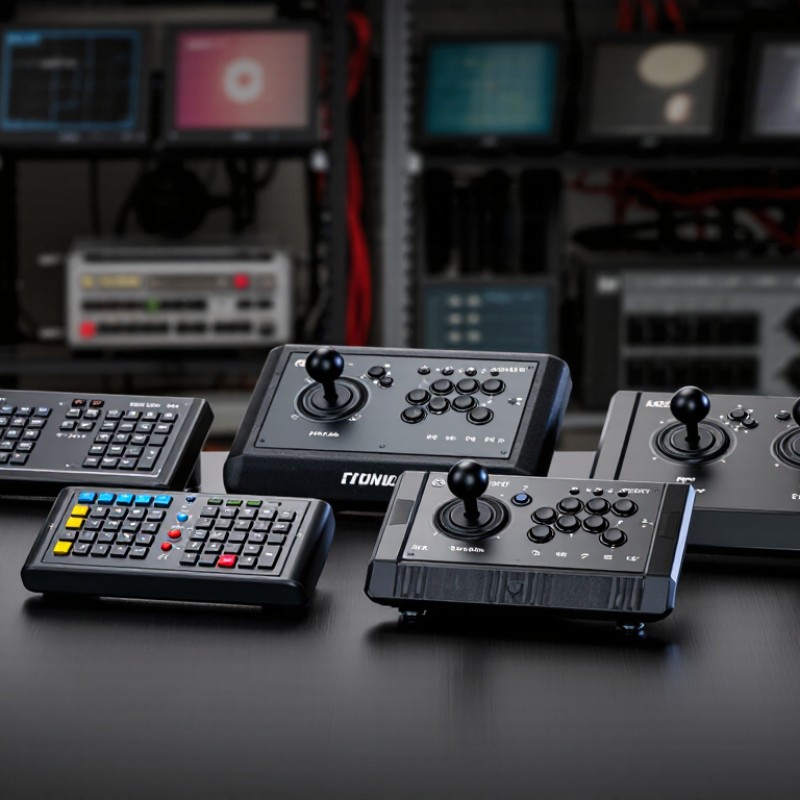
Top 10 PTZ Keyboard Controllers for Buyers in 2026

What a PTZ Keyboard Controller Does

A PTZ keyboard controller is a hands-on interface for operating pan, tilt, and zoom cameras. The joystick moves a camera left, right, up, or down, while zoom controls bring a distant speaker closer. Buttons may recall saved positions, adjust focus, or switch cameras, depending on the model and setup. One press can return a camera to a lectern, doorway, or wide room view.

It sends commands to compatible cameras through a supported connection, such as a network or serial link. The controller does not create a better image by itself. It helps an operator make repeatable moves without searching through software menus. In a small studio, one person might frame a presenter, save that position, then move to a second camera during a transition. The exact workflow varies.

Feel matters. A joystick that responds too quickly can make a close-up wobble; one that is too slow may miss a live moment. Presets save time, but only when they are named and tested clearly. It is easy to assume every controller works with every camera. That is not always true. Check supported protocols, camera limits, and button mapping before buying, then test the setup in the actual room. A little awkwardness remains part of learning the controls.

What a PTZ Keyboard Controller Does

A PTZ controller provides hands-on control of camera movement and lens settings.

The bars count common control parameters: pan and tilt are the two movement axes; zoom, focus, and iris are lens controls. Focus and iris control availability depends on the camera and setup.

Key Features and Compatibility Standards for PTZ Control

For 2026 buyers, PTZ keyboard compatibility starts with the control path: IP, serial, or both. MarketsandMarkets’ Video Surveillance Market report estimated a $53.7 billion market in 2023 and projected $83.3 billion by 2028. That growth makes interoperability worth checking, not assuming. Match the controller’s supported ONVIF profile or serial protocol to the camera, then confirm pan, tilt, zoom, focus, presets, and speed control. A shared “ONVIF” label alone does not guarantee every PTZ command works.

Check the details. For serial systems, verify RS-422 or RS-485 wiring, baud rate, parity, and camera address; a wrong setting can leave a joystick apparently dead. For IP systems, check network discovery, authentication, and whether the controller supports the camera’s required profile and functions. Also compare preset counts and joystick response: a fast zoom near a stage may feel very different from slow movement across a wide room. Specifications can be frustratingly vague, so request a compatibility list or test unit before purchase.

Tips: Test the exact camera-controller combination, not just a similar model. Try presets, variable-speed movement, and simultaneous camera switching. Small labels matter. Record firmware versions and connection settings; they make troubleshooting easier later.

How to Evaluate PTZ Keyboard Controllers in 2026

A PTZ keyboard controller should feel predictable before its feature list looks impressive. Check whether its joystick moves cameras smoothly at both slow and fast speeds. Small movements matter when framing a speaker or following someone across a stage. Feel matters. Try the controls with the cameras and software you plan to use, not only a display unit. Confirm supported control protocols, connection types, and camera limits before comparing prices.

Test preset recall, focus, zoom, and iris controls during a realistic session. Do saved positions return consistently? Can an operator reach essential functions without looking down? These details affect live work. Check the screen in dim rooms, the key labels, and whether common controls can be reached comfortably. Also examine setup steps: unclear network settings can turn a quick installation into a long troubleshooting session.

Reliability deserves more than a checklist. Run the controller for an extended period, reconnect it after a network interruption, and watch for delayed commands or lost presets. Record what happened. A spreadsheet may still miss an important detail: joystick resistance can feel different after several hours. That is worth considering. Avoid assuming that more buttons mean better control; a crowded layout may slow a new operator. Compare the controller against your actual workflow, and leave room for a second test.

Top 10 PTZ Keyboard Controllers for Buyers in 2026 — How to Evaluate PTZ Keyboard Controllers in 2026

This is a practical comparison of ten common PTZ keyboard-controller types, rather than a ranking of specific branded products. Use the checklist to match a controller to your cameras, network, and workflow.

Controller Type Best Fit Typical Controls Common Connection Options What to Verify Before Buying Main Trade-Off
1. Basic joystick controller Small studios and single-operator setups Joystick for pan, tilt, and zoom; camera selection; basic preset controls Often RS-485 or RS-232; some models also provide Ethernet Supported control protocols, camera addressing, joystick response, and whether presets can be called and stored Simple to learn, but may lack advanced configuration and multi-camera workflow features
2. IP-network PTZ keyboard Installations using cameras controlled over an IP network Joystick, camera selection, presets, and programmable keys on some models Ethernet; control may use a supported network protocol or camera-specific integration Exact camera compatibility, network discovery method, IP settings, firmware requirements, and supported protocol version Convenient for networked systems, but compatibility should be confirmed camera by camera
3. Serial-protocol controller Legacy or dedicated camera-control wiring Joystick, address selection, zoom, focus, and preset functions, depending on model RS-485, RS-422, or RS-232, depending on the controller and camera Electrical interface, wiring polarity, baud rate, camera address, and protocol support such as VISCA or Pelco variants Can work without an IP control network, but setup depends on correct wiring and serial settings
4. Hybrid serial-and-IP controller Sites combining network cameras with serial-controlled equipment Joystick, camera selection, presets, and selectable control paths Typically Ethernet plus one or more serial interfaces Which control methods can operate simultaneously, supported camera counts, and whether protocol settings are configurable per camera More adaptable, but configuration can be more involved than with a single-interface unit
5. Multi-camera production controller Live production, houses of worship, and event spaces Joystick, camera selection, preset recall, and quick-access keys; some include focus or iris controls Usually Ethernet, serial, or both, depending on the system Camera switching workflow, preset capacity, control latency, tally or production-system integration, and operator ergonomics Optimized for fast operation, but advanced production integrations may require compatible equipment
6. Broadcast-style controller with display Control rooms where operators need visible status and configuration feedback Joystick, keypad, camera selection, preset controls, and a status display on equipped models Commonly Ethernet and/or serial connections Information shown on the display, menu usability, camera naming, saved settings, and control-protocol coverage Clearer status feedback, but the display alone does not guarantee broader camera compatibility
7. Preset-focused controller Repeatable shots in lecture rooms, studios, and meeting spaces Dedicated preset buttons or a keypad for recalling saved camera positions Ethernet or serial, depending on the camera and controller Number of usable presets, whether presets are stored in the camera or controller, and how presets are assigned and recalled Speeds up repeated shots, but preset behavior and capacity vary by camera integration
8. Compact desktop controller Mobile production kits and workstations with limited desk space Compact joystick and a smaller set of buttons or keys USB, Ethernet, or serial connections, depending on model Whether USB is for control, power, or configuration; driver needs; cable length; and compatibility with the operating system or control application Portable and space-saving, but may provide fewer direct controls
9. Programmable-key controller Operators who want frequent functions on dedicated keys Joystick plus assignable keys for functions such as camera selection or preset recall, where supported Typically Ethernet, serial, or both Which functions are assignable, whether assignments survive a restart, and whether configuration software is required Can reduce menu navigation, but programming options differ substantially between models
10. System-integrator control panel Large installations managed through a broader control system May combine PTZ joystick control with buttons for scenes or other system actions Often Ethernet; integration may use supported APIs, control protocols, or a separate control processor Documented integration method, licensing or configuration needs, security requirements, and responsibility for system support Can fit complex workflows, but typically needs more design and commissioning than a standalone controller

Evaluation checklist: Confirm the exact camera-controller compatibility list; match network or serial interfaces; verify protocol names and versions rather than relying on a generic “PTZ compatible” claim; check joystick feel, preset workflow, camera addressing, firmware support, power requirements, and warranty. Protocol support—including VISCA, Pelco-D/P, and ONVIF-related control—varies by device and implementation, so confirm the specific functions required for your cameras.

Top 10 PTZ Keyboard Controllers for Buyers in 2026

A PTZ keyboard controller should make camera movement predictable, not merely offer a long feature list. When comparing ten options, check how smoothly the joystick handles slow pans and small tilt corrections. A camera view can jump noticeably during a quiet interview or a close-up. Feel matters. Look for clearly labeled preset keys and a display that remains readable under dim control-room lighting.

Compatibility deserves careful attention. Confirm that the controller supports your cameras’ control protocols and connection types, such as network or serial links. Then check how many cameras it can manage and whether operators can switch between them without losing track of the selected unit. Some specifications sound similar but describe different capabilities. Verify details in the technical documentation, especially preset limits and configuration requirements.

Ergonomics can shape a long shift. Compare key spacing, joystick resistance, and whether frequently used controls are reachable without stretching. A numbered camera list or clear status indicator may prevent avoidable selection errors. Ask whether the device supports useful functions such as focus, iris, and speed adjustment, rather than assuming every controller does. No feature table captures the feel of real operation, so test a shortlist with the cameras and workflow you intend to use. That takes time, and it may expose an awkward compromise.

Choosing a Controller for Different PTZ Camera Setups

Choosing a PTZ keyboard controller starts with the camera setup, not the feature list. For one camera in a small meeting room, prioritize a clear joystick, responsive zoom control, and quick access to preset positions. A crowded panel can slow down simple tasks. Check that the controller supports the camera’s control method, such as IP or serial, before buying. Compatibility details matter.

Multi-camera studios need a different layout. Look for direct camera selection, readable displays, and controls that remain easy to identify during a live session. If operators switch between wide and close shots, test how quickly they can recall presets and adjust pan, tilt, and speed. In classrooms or lecture halls, consider where the controller will sit and whether its buttons are easy to reach without looking down. A setup that seems tidy on paper may still feel awkward at the desk; it is worth testing in the actual room.

Tips: Confirm protocol support, power requirements, and camera capacity. Try the joystick with the slowest planned movement. Small control delays can be distracting. Keep a written preset map nearby during initial setup.

FAQS

What should be tested before choosing a PTZ keyboard controller?

Test the joystick, zoom, focus, iris, presets, protocols, connections, and supported camera capacity. Feel matters.

Why is joystick movement important?

Smooth movement helps frame speakers and follow people across a stage. Test slow and fast speeds.

How can preset performance be evaluated?

Save several positions, recall them repeatedly, and check whether each camera returns consistently. Record any missed positions.

What layout works well for multi-camera setups?

Direct camera selection, readable displays, and clearly separated controls help during live sessions. More buttons are not always better.

How should a controller be tested in a classroom or meeting room?

Place it where the operator will work, then reach controls without looking down. A tidy layout may feel awkward.

What compatibility details should buyers confirm?

Confirm control protocols, connection types, power requirements, and the number of supported cameras. Compatibility comes first.

How can reliability be checked over time?

Run the controller for several hours, reconnect it after network interruptions, and watch for delayed commands. Keep written records.

Why should buyers perform a second test?

A spreadsheet may miss changing joystick resistance or operator fatigue. Test again later.

Conclusion

A PTZ Keyboard Controller gives operators direct, hands-on control of pan, tilt, and zoom functions, making it easier to manage camera movement during live production, security monitoring, and other video workflows. This guide explains how these controllers work and highlights the features that matter most, including joystick precision, button layout, connection options, protocol support, and compatibility with cameras and control systems.

The article also offers a practical framework for comparing the top 10 options for buyers in 2026, focusing on usability, reliability, setup requirements, and value. Whether you are choosing a Ptz Keyboard for a single camera or a multi-camera installation, the right controller should suit your workflow, work smoothly with your equipment, and provide comfortable, dependable control.

Liam

Liam

Liam is a dedicated marketing professional with a profound expertise in the industry, where he excels at highlighting the unique advantages of our core products. With a keen understanding of market trends and consumer needs, Liam frequently updates our company’s professional blog, providing......